
The AI video production landscape is evolving at an unprecedented pace, fundamentally reshaping content creation. For creative directors, marketers, and studio owners, mastering the modern AI video production workflow is no longer optional in 2026—it's essential for staying competitive. Recent advancements like Google Veo 3.1 are setting new benchmarks for 4K resolution and synchronized audio generation, proving the industry's rapid innovation. This comprehensive guide from StudioIndex.ai will demystify the entire AI video production workflow, from initial ideation to final output, showcasing how AI tools are enhancing creative possibilities, delivering significant business value, and setting new standards for efficiency.
What is the AI Video Production Workflow? Redefining Content Creation
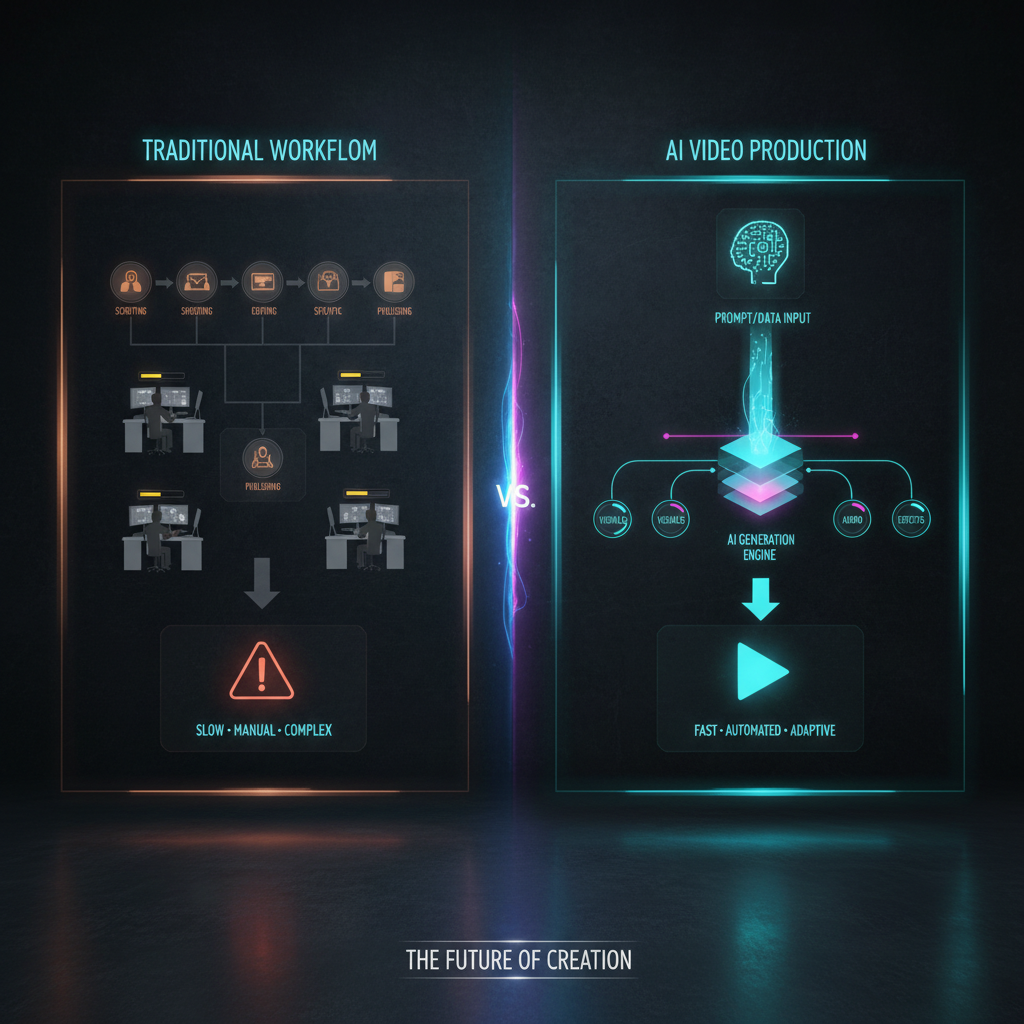
The AI video production workflow encompasses the entire lifecycle of creating video content with substantial assistance from artificial intelligence. This sophisticated process ranges from initial ideation and scriptwriting to generative video creation, advanced editing, and strategic distribution. This integrated approach fundamentally streamlines traditional stages, shifting the focus from manual, labor-intensive execution to AI orchestration and precise human oversight. It is about leveraging intelligent algorithms to accelerate and augment every step of the creative journey within the AI video production workflow.
AI tools are profoundly reshaping video creation by delivering tangible and impressive benefits across various industries. They drastically reduce average production costs by an impressive 91% compared to traditional methods, making high-quality video content accessible to a broader range of businesses and creators. Furthermore, AI accelerates time-to-publish by 68%, enabling rapid response to market trends and a sustained presence across diverse platforms. This efficiency empowers businesses to produce high volumes of compelling video content without compromising on quality or budget, demonstrating the power of the AI video production workflow.
The market for AI video generation is experiencing explosive growth, solidifying its role as a critical technology in 2026. The global AI video generation market is projected to reach an impressive $18.6 billion by the end of 2026, demonstrating a robust Compound Annual Growth Rate (CAGR) of 34.2% between 2023 and 2028. This growth is driven by widespread adoption: 78% of marketing teams now use AI-generated video in at least one campaign per quarter, and the number of monthly active users across AI video platforms surpassed 124 million in January 2026. These statistics underscore the pervasive and transformative impact of AI on video content creation within the modern AI video production workflow.
AI-Powered Pre-Production: Ideation, Scripting, and Storyboarding in the Workflow
The initial, often time-consuming, pre-production phase in the AI video production workflow benefits immensely from intelligent automation. AI models can dramatically accelerate and enhance creative concept development. Large language models (LLMs) analyze vast datasets of market trends, audience demographics, and successful video campaigns to suggest compelling video ideas. They also identify optimal target keywords and propose narrative angles that resonate with specific audiences. This capability significantly cuts down initial ideation time, allowing creative teams to explore more concepts in a fraction of the time, thereby optimizing the early stages of the AI video production workflow.
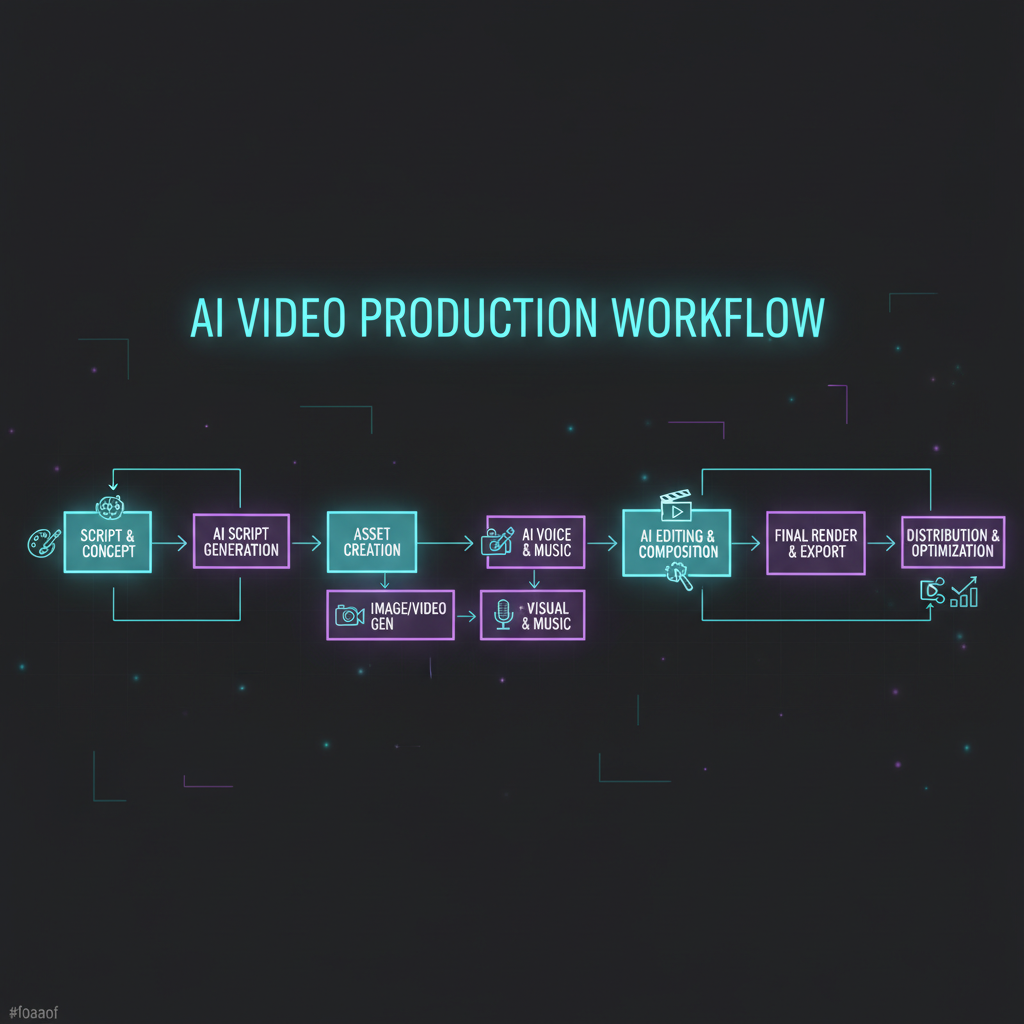
Beyond ideation, AI tools excel at streamlining scriptwriting and copy generation. They can draft multiple script variations, refine dialogues, craft engaging headlines, and even generate precise calls-to-action (CTAs) that are optimized for engagement and conversion. Platforms like ChatGPT Pro, which offers access to Sora 2 Pro, or even general-purpose AI text models, can produce high-quality script drafts in minutes. This rapid iteration allows creators to quickly test different narrative structures and messaging, ensuring the final script is polished and impactful before any visual production begins in the AI video production workflow.
Visualizing scenes before a single frame is animated is another area where AI shines in pre-production. AI image generators can rapidly create detailed reference images for characters, settings, mood boards, and key visual elements. This capability is invaluable for informing the subsequent video generation process and maintaining visual consistency, particularly with advanced features such as Google Veo 3.1's "Ingredients to Video." This innovative feature allows creators to use up to four reference images per generation to maintain subject identity and stylistic coherence across diverse scene changes, providing an unprecedented level of control over character appearance within the AI video production workflow.
A $1,000,000 AD Using Just 2 tools | Full AI Workflow — Higgsfield AI
Core AI Video Generation: Selecting the Right Tools for Your AI Video Production Workflow
The heart of the AI video production workflow lies in selecting the right generation tools, each offering distinct strengths and capabilities. As noted by the multi-model platform Hedra, no single AI model excels at everything, prompting enterprises to use an average of 3.2 different AI video tools simultaneously to achieve their diverse creative and business objectives. Understanding the specific strengths, features, and nuanced pricing models of each platform is therefore crucial for making informed decisions within your AI video production workflow.
Here's a comparison table of leading AI video generation tools as of early 2026, highlighting their primary strengths, key features, pricing structures, and important limitations:
| Tool Name | Primary Strength | Key Features (2026) | Pricing (Starting Tier/Free) | Key Limitation/Note |
|---|---|---|---|---|
| Google Veo 3.1 | Raw Quality, Cinematic Fidelity | Native 4K, synchronized audio, "Ingredients to Video" (character consistency up to 4 refs) | Google AI Pro: $19.99/month (1,000 credits, watermarked); Free: 100-180 credits/month | Requires Google AI Pro or Ultra ($249.99/month) for watermark-free output. Credit consumption for Veo 3.1 is high (40 credits/second). |
| Runway ML Gen-4.5 | Creative Text-to-Video, Filmmaking, Editing Suite | Image & text input, advanced creative controls, motion quality. Comprehensive editing. | Standard: $12/month (625 credits/month, 1080p). Unlimited: $76/month (2,250 credits + "Explore Mode") | "Unlimited" plan has reported throttling and account issues for heavy users, often resulting in account suspensions for heavy usage. A 10-second Gen-4.5 video costs ~120 credits. |
| OpenAI Sora 2 | Narrative Storytelling, High Fidelity (when accessible) | High-quality generation, long coherent scenes. | ChatGPT Pro: $200/month (for "Sora 2 Pro" - 1080p, unlimited, watermark-free). Invite-only iOS (free core features) | Primarily invite-only access. Direct pricing is high; third-party APIs like Kie.ai or Global GPT offer more flexible pricing (e.g., $0.50/second for 1080p Sora 2 Pro). |
| Kling AI 2.6 | Photorealistic Humans, Realistic Motion, Audio | Native audio, excellent physics, good understanding of complex prompts. | Standard: $6.99/month (660 credits/month for ~33 videos). Free: ~66 daily credits (watermarked, 5s limit). | A 10-second "Professional Mode" video consumes ~70 credits, quickly depleting lower-tier plans. Ultra tier is $127.99/month for 26,000 credits. |
| Luma Dream Machine | Speed, Cinematic Realism, Physics | Fast generation (5s in <120s), high-fidelity, realistic physics. | Plus: $29.99/month (10,000 credits/month, no watermarks, commercial). Free: 30 generations/month (watermarked, non-commercial). | High-resolution videos consume significantly more credits (e.g., a 5-second 1080p Ray3 video requires 800 credits). |
| Pika Labs 2.2 | Social Media Content, Rapid Iteration, Experimental | Fast iteration, creative & experimental animations, watermark-free exports (paid tiers). | Standard: $28/month (700 credits/month, commercial rights). Free: 80-150 credits/month. | Credit amounts can be confusing/vary across reported sources. Best for shorter, stylized content rather than hyper-realism or long-form narrative. |
| HeyGen | Avatar-Based Corporate Videos, Personalization | High-quality lip-sync, personalized & translated video, scalable. | Starting at $29/month. | Focus is on avatar generation and script-to-video; less on free-form creative generation or complex scene composition. |
| Synthesia | Enterprise-Grade Avatars, Explainer Videos | Scalable content, professional digital avatars, training materials. | Business plan starts around $83/month. | High-cost enterprise solution, offering less flexibility for experimental or unique creative projects. |
Matching the right tools to project needs is paramount for an effective AI video production workflow. For achieving raw cinematic quality and maintaining consistent characters across scenes, Google Veo 3.1 and Runway ML Gen-4.5 are top contenders, with Veo 3.1's 4K capabilities and "Ingredients to Video" feature setting a new bar. If narrative storytelling is the priority and you can secure access, OpenAI Sora 2 remains "the one to watch" for its high fidelity and coherent scenes. For rapid social media content, creative experimentation, or quick animations, Pika Labs 2.2 and Luma Dream Machine offer exceptional speed and creativity.
Understanding pricing and credit systems is also crucial for efficient budgeting within the AI video production workflow. Most platforms operate on a credit basis, where costs vary significantly depending on the desired resolution, video duration, and the specific AI model used. For instance, a 10-second video in "Professional Mode" on Kling AI 2.6 consumes approximately 70 credits. Users must meticulously manage credit usage to avoid unexpectedly high costs or hitting generation limits, a common complaint highlighted in various community forums regarding platforms like Runway ML.
To explore leading AI video production studios that expertly navigate these toolsets and create stunning visuals, visit StudioIndex.ai/studios.
AI in Post-Production: Refining and Enhancing Your Video Assets within the Workflow
Post-production in an AI video production workflow moves far beyond traditional editing, integrating powerful AI capabilities to refine and enhance video assets. AI-powered upscaling and resolution enhancement are now standard components. Tools like Luma Dream Machine offer robust 4K upscaling, transforming standard definition or lower-resolution AI-generated outputs into high-resolution assets suitable for diverse platforms and professional broadcast. This dramatically improves the visual fidelity of AI-generated content, making it, in many cases, indistinguishable from traditionally shot footage.
The latest AI models are also making audio post-production more efficient and integrated than ever before within the AI video production workflow. Kling AI 2.6 and Google Veo 3.1 now include native, synchronized audio generation directly within their video outputs, eliminating the need for extensive manual sound design for basic outputs. For more advanced needs, AI tools can assist with generating high-quality voiceovers, curating appropriate background music based on mood and genre, and even performing sophisticated audio cleaning to remove unwanted noise. This ensures a polished final product with cohesive visual and auditory elements.
While human editors remain crucial for artistic direction and nuanced storytelling, AI can significantly accelerate tedious tasks in editing, color grading, and special effects. AI can intelligently suggest optimal cuts based on pacing and narrative flow, refine color palettes for stylistic consistency across an entire project, and even generate basic visual effects or transitions. This augmentation allows human creatives to elevate their focus to high-level artistic direction and intricate narrative choices, rather than being bogged down by repetitive technical adjustments. This collaborative approach defines the modern AI video production workflow.
The AI Video Workflow BLOWING UP Businesses in 2026 — Wes McDowell
Optimizing the AI Video Production Workflow for Business Impact
Integrating an optimized AI video production workflow can be a game-changer for businesses seeking to maximize their marketing and advertising ROI. Companies leveraging AI for product listings have reported a staggering 156% increase in engagement. Furthermore, short-form AI videos, typically under 60 seconds, generate 2.7 times more engagement than static content, making them ideal for dynamic digital campaigns. B2B marketers, in particular, show high adoption rates, with 52% stating AI video is their most adopted new marketing technology for 2025–2026, demonstrating its critical role in modern business communication and overall AI video production workflow efficacy.
AI enables the scalable creation of personalized content across diverse industries, significantly enhancing the utility of the AI video production workflow. The education sector, for example, accounts for 19% of all AI-generated videos, making it the second-largest category after marketing. In real estate, agencies utilizing AI video walkthroughs report 2.4 times more inquiries per listing, highlighting the power of immersive content. Impressively, 73% of Fortune 500 companies have integrated AI video tools into their content workflows, underscoring its enterprise-level utility and its capacity to drive efficiency and innovation at scale.
Embracing and optimizing the AI video production workflow now is crucial for future-proofing content strategies. Businesses that leverage AI currently benefit from an average 91% reduction in production costs and a 68% faster time-to-publish, enabling them to stay at the forefront of content innovation and maintain a competitive edge in an increasingly digital landscape. This strategic adoption positions organizations for long-term success in video content creation.
For businesses seeking to implement and scale an optimized AI video production workflow, connecting with expert studios listed on StudioIndex.ai/studios can provide a competitive advantage and ensure seamless integration of these powerful tools.
Navigating the Future of AI Video: Challenges and Best Practices within the Workflow
While the benefits of the AI video production workflow are immense, navigating its complexities requires awareness of current challenges and adherence to best practices. A significant point of frustration for users, frequently discussed on forums like Reddit, is the misleading nature of "unlimited" plans, particularly with Runway ML. Users report heavy throttling after consuming an initial credit allotment and, in some cases, account suspensions or bans for perceived "suspicious activity" after heavy usage, often without recourse. Navigating complex credit systems and avoiding unexpected depletion requires careful planning and a thorough understanding of each tool’s specific usage metrics and hidden limitations within the AI video production workflow.

Despite rapid advancements, AI video tools still face hurdles in achieving absolute perfection. Users occasionally encounter "janky physics" or struggles with maintaining precise character consistency across complex, longer scenes, especially with certain models. Achieving high-quality, professional outputs often necessitates a "human-in-the-loop" approach, where AI-generated clips are refined with traditional editing, creative direction, and manual adjustments to ensure visual fidelity and narrative coherence. This blending of AI efficiency with human artistry is key to delivering superior results within the AI video production workflow.
Perhaps the most significant emerging challenge is mitigating the risk of "soulless" content and market saturation. With the proliferation of readily available AI-generated content, there's a growing concern that generic, "automated or soulless" videos will lead to audience fatigue and reduced engagement. Best practices involve using AI as a powerful assistant to human creativity, focusing on crafting unique and specific prompts, infusing projects with distinct artistic direction, and strategically integrating AI-generated elements into a broader, human-curated content strategy to avoid producing commoditized or unengaging outputs. This proactive approach ensures the enduring value of your AI video production workflow.
Create Professional AI Videos with This Secret Workflow — Curious Refuge
FAQ Section
Q1: What is the average cost savings when using AI for video production?
AI video tools significantly reduce production expenses, leading to an average cost saving of 91% compared to traditional video production methods. This dramatic reduction in expenditures makes professional-grade video creation substantially more affordable and accessible for businesses of all sizes and for individual content creators. These savings stem from automating time-consuming tasks like ideation, scriptwriting, animation, and basic editing, which typically require extensive human labor and specialized equipment in conventional workflows. This efficiency allows for greater budgetary flexibility and the ability to produce more content within existing financial constraints, thereby optimizing the entire AI video production workflow.
Q2: Which AI video generator offers the best quality in early 2026?
In early 2026, Google Veo 3.1 currently sets the industry standard for raw AI video generation quality within the AI video production workflow. This advanced model delivers native 4K resolution, ensuring crisp and highly detailed visuals, along with synchronized native audio, which simplifies the post-production process. A standout feature is its "Ingredients to Video" capability, which allows creators to maintain impressive character consistency across scene changes by leveraging up to four reference images per generation. This makes Veo 3.1 a top choice for projects demanding cinematic fidelity and robust control over visual elements, streamlining complex creative tasks.
Q3: Can AI video tools generate human characters with realistic motion and audio?
Yes, AI video tools have made significant strides in generating realistic human characters, a crucial aspect of an advanced AI video production workflow. Kling AI 2.6 is particularly noted for its exceptional capability in creating photorealistic human characters with highly realistic motion. This tool excels at understanding complex prompts, enabling nuanced and natural movement. Furthermore, the 2.6 model now includes integrated native audio generation, which synchronizes sound directly with the character's actions and dialogue. This combination enhances the overall realism and narrative immersion, making it a powerful solution for character-driven video content and complex storytelling.
Q4: What are some common frustrations users experience with AI video platforms?
Users frequently encounter several pain points when working with AI video platforms, impacting their AI video production workflow. A major frustration revolves around misleading "unlimited" plans, notably with Runway ML, where users often report heavy throttling or even account suspensions after exceeding an initial credit threshold. The presence of watermarks on videos generated with free or lower-tier subscriptions is another common complaint, limiting their professional utility. Additionally, the complexity and rapid depletion of credit systems often lead to unexpected costs. Finally, users sometimes struggle with maintaining perfect character consistency or achieving entirely realistic physics in AI-generated videos, requiring further manual refinement and human oversight.
Q5: How fast is the Luma Dream Machine for video generation?
Luma Dream Machine is widely recognized for its exceptional speed in generating high-fidelity, cinematic clips, making it a highly efficient tool within any AI video production workflow. This platform is capable of producing 5-second videos in under 120 seconds, making it one of the fastest options available for quick content turnaround and rapid prototyping. Beyond its impressive speed, Luma Dream Machine is also highly regarded for its ability to generate videos with incredibly realistic physics, contributing to a believable and immersive visual experience. This combination of rapid generation and high fidelity makes it a preferred tool for motion designers and filmmakers who prioritize both efficiency and the ability to iterate quickly without compromising on visual quality.
To discover studios leveraging these advanced tools and mastering the AI video production workflow, visit StudioIndex.ai/studios and connect with industry leaders.
Related Posts

AI in Hollywood: Transforming Video Production
AI is revolutionizing Hollywood video production in 2026. Discover top tools like Sora 2, Runway Gen-4, and Kling 2.6, their pricing, and impact on filmmaking. Find AI studios here.
Read more
The 10 Best AI Video Production Studios in 2026
A curated guide to the top AI video production studios for brands, agencies, and marketing teams. Covering AI-native studios, AI-augmented agencies, and specialist freelancers — with pricing, tools used, and what each studio does best." author: "StudioIndex Editorial
Read more
AI Video Tools Compared: Features, Pricing & Quality in 2026
Unlock the best AI video tools for your studio. Our 2026 AI video tools comparison covers pricing, features, and quality for Runway, Sora, Pika, and more. Elevate your production today!
Read more